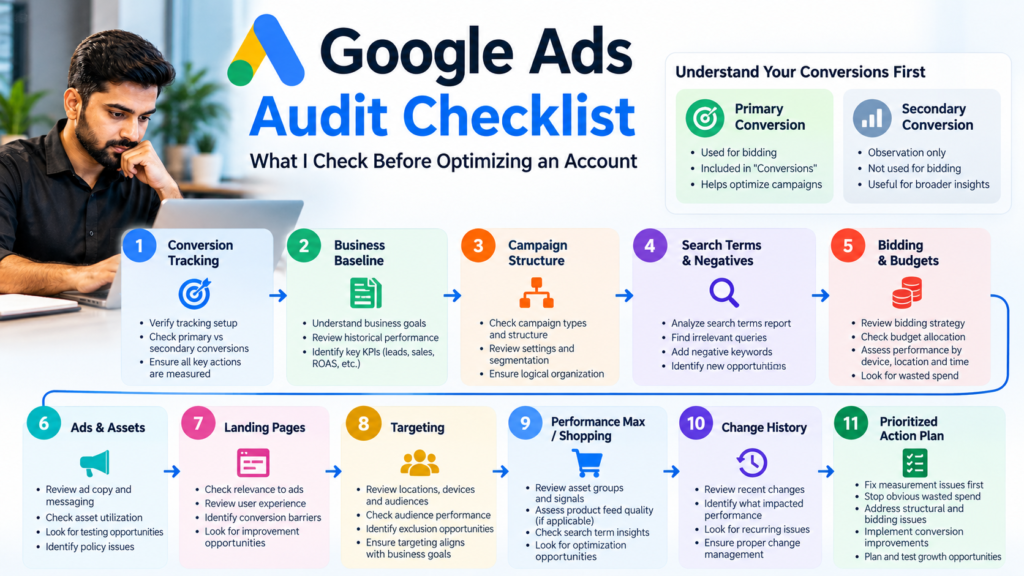
Quick answer: I audit a Google Ads account in a specific order: verify conversion tracking first, establish the business baseline, review campaign settings and structure, inspect search terms and negatives, evaluate bidding and budgets, check ads and landing pages, then review Shopping or Performance Max where relevant. I do not start by applying Google’s recommendations, because optimization decisions are only useful when the conversion data behind them is trustworthy.
Google Ads Audit Checklist: The Order I Use
| Priority | Audit area | Main question |
|---|---|---|
| 1 | Conversion tracking | Are we measuring the right business outcomes accurately? |
| 2 | Business baseline | What do CPA, ROAS, lead quality or revenue actually need to achieve? |
| 3 | Campaign settings & structure | Is the account organized around the right goals, markets and campaign roles? |
| 4 | Search terms & keywords | What queries are actually consuming budget? |
| 5 | Bidding & budgets | Are bidding signals and budget allocation aligned with reliable data? |
| 6 | Ads & assets | Do ads match search intent and communicate the offer clearly? |
| 7 | Landing pages | Does the post-click experience support the conversion? |
| 8 | Targeting | Are geography, devices, audiences and schedules spending where the business can win? |
| 9 | PMax / Shopping | Are feeds, asset groups, brand traffic and automation behaving as intended? |
| 10 | Change history & recommendations | What changed before performance moved, and which recommendations actually serve the business? |
1. Verify Conversion Tracking Before Touching the Campaigns
This is my first check because bidding, CPA, ROAS and budget decisions become unreliable when the account is optimizing toward the wrong actions.
- Identify every conversion action and its source.
- Check which actions are Primary and which are Secondary.
- Confirm that a lead, purchase, booking or other valuable outcome is not being counted twice.
- Test important forms, calls or ecommerce events rather than assuming a tag is working because it exists.
- Review Google Ads, GA4 and Google Tag Manager configuration where relevant.
- Check enhanced conversions when appropriate.
- For lead generation, determine whether the account measures only form submissions or can connect advertising to qualified leads and customers.
A campaign can look efficient while feeding Smart Bidding low-quality or duplicated conversions. I want to know what a conversion actually means to the business before I trust the conversion column.
2. Establish the Business Baseline
I do not judge an account from CTR or CPC alone. Before diagnosing performance, I establish the outcome the business needs and compare it with recent account data.
- Spend and budget
- Conversions and conversion value
- Cost per qualified lead or acquisition where available
- ROAS for revenue-tracked businesses
- Lead quality and sales feedback for lead-generation businesses
- Recent performance versus an appropriate previous period
- Seasonality, promotions or tracking changes that make comparisons misleading
The date range depends on the business and data volume. I prefer enough recent data to reveal patterns without blindly mixing periods that operated under different tracking, offers or market conditions.
3. Audit Campaign Settings and Account Structure
Next I map what each campaign is supposed to do. An account can contain individually reasonable campaigns that collectively overlap, compete for the same intent, or send budget toward the wrong market.
- Campaign objective and role
- Brand versus non-brand strategy
- Search, Shopping, Performance Max, Display or Video roles
- Location targeting and location options
- Networks and language settings
- Ad-group or asset-group organization
- Goal settings at account and campaign level
- Unnecessary overlap between campaigns
4. Read the Search Terms Before Judging the Keywords
Keywords tell me what the advertiser asked Google to target. Search terms tell me what people actually typed. That makes the search terms report one of the highest-value parts of a Search campaign audit.
- Sort meaningful search-term data by cost and conversion performance.
- Flag irrelevant, job-seeking, free, DIY, research-only or wrong-service intent where it cannot become a customer.
- Look for valuable query themes that deserve stronger coverage.
- Review negative keyword lists and conflicts.
- Check brand leakage into campaigns intended to acquire non-brand demand.
- Review match types in the context of conversion quality and bidding—not in isolation.
Broad match is not automatically bad, and exact match is not automatically good. I care about the search intent Google is buying and whether the account has the conversion signals and controls needed for its targeting strategy.
5. Review Bidding and Budget Allocation
A bid strategy should fit the campaign goal and the quality of the data feeding it. I avoid universal rules such as “use Target CPA after exactly X conversions,” because account economics, conversion quality, sales cycle and data stability differ.
- Current bidding strategy and targets
- Whether the campaign is constrained by budget
- Whether targets are realistic relative to recent performance
- Budget distribution between strong and weak campaigns
- Recent bid-strategy or budget changes
- Whether automated bidding is optimizing toward meaningful conversions
6. Audit Ads, Assets and Message Match
I review whether the ad reflects the intent behind the search and gives the prospect a reason to choose the business. Ad Strength can be useful as a diagnostic input, but it is not the business KPI.
- Responsive Search Ad coverage and relevance
- Headlines and descriptions aligned with the offer
- Sitelinks, callouts, structured snippets, images and call assets where relevant
- Disapprovals or policy limitations
- Consistency between keyword/query, ad promise and landing page
7. Check the Landing Page Like a Customer
Google Ads cannot repair a weak post-click experience. I open important landing pages on mobile and desktop and test the actual path to conversion.
- Does the page match the ad and search intent?
- Is the offer immediately understandable?
- Do forms, calls, checkout or booking actions work?
- Is the page usable on mobile?
- Are trust signals and important business information present?
- Are there unnecessary distractions or steps before conversion?
8. Review Location, Device, Audience and Schedule Data
I check whether spend is reaching people the business can actually serve and whether meaningful performance differences exist across geography, devices, audiences or time. I do not automatically exclude a segment simply because a small sample looks worse; the amount and quality of data matter.
9. Audit Performance Max and Shopping Separately
Performance Max and Shopping need additional checks because product data, automation and cross-channel delivery can hide problems that do not exist in a standard Search campaign.
- Merchant Center diagnostics and product eligibility
- Product titles, attributes and feed quality
- Asset-group organization and creative coverage
- Search themes and available search-term/search-category insights
- Brand traffic and potential overlap with Search
- Channel performance and campaign insights where available
- URL expansion, exclusions and suitability for the business
- Conversion goals and value signals feeding automation
10. Check Change History Before Explaining a Performance Shift
When performance changes, I compare the timing with account changes. Budget jumps, new bid strategies, targeting edits, conversion-action changes, new assets or campaign launches can explain a trend that otherwise looks mysterious.
11. Treat Google’s Recommendations as Suggestions, Not Instructions
I review recommendations after understanding the account. Some can be useful; others may increase reach or spend without solving the business problem. I evaluate each recommendation against conversion quality, economics and campaign strategy rather than optimizing for the Optimization Score itself.
How I Prioritize Findings After the Audit
An audit is not valuable because it finds the longest list of issues. I prioritize findings by business impact and dependency.
- Measurement problems first: fix data that can mislead every later decision.
- Clear wasted spend next: stop traffic or settings that cannot support the goal.
- Structural and bidding issues: improve how budget and signals are organized.
- Conversion-rate opportunities: strengthen ads, offers and landing pages.
- Growth tests last: expand only after the account has a trustworthy foundation.
A Real Audit Should Produce an Action Plan
The final output should not be a generic score. It should explain what is wrong, why it matters, what evidence supports the finding, how urgent it is, and what should happen next.
I’m Zafir Ch, a Google Ads specialist who has served 500+ clients globally across digital marketing. My Google Ads work includes Search, Shopping, Performance Max, conversion tracking, GA4, Google Tag Manager, Merchant Center, lead generation and ecommerce optimization.
If you need hands-on account management after an audit, see my Google Ads specialist services. You can also review selected work in my portfolio.
Google Ads Audit Checklist: Final Takeaway
Do not start an audit by changing bids, adding keywords or chasing an optimization score. Start by proving that the account measures the right outcomes. Then follow the money: understand what campaigns are for, what searches consume budget, what automation is being told to optimize toward, and whether the landing experience can convert the traffic you are buying.